版本新功能
了解如何在 EasyAppSwiftUI 中实现版本新功能介绍页
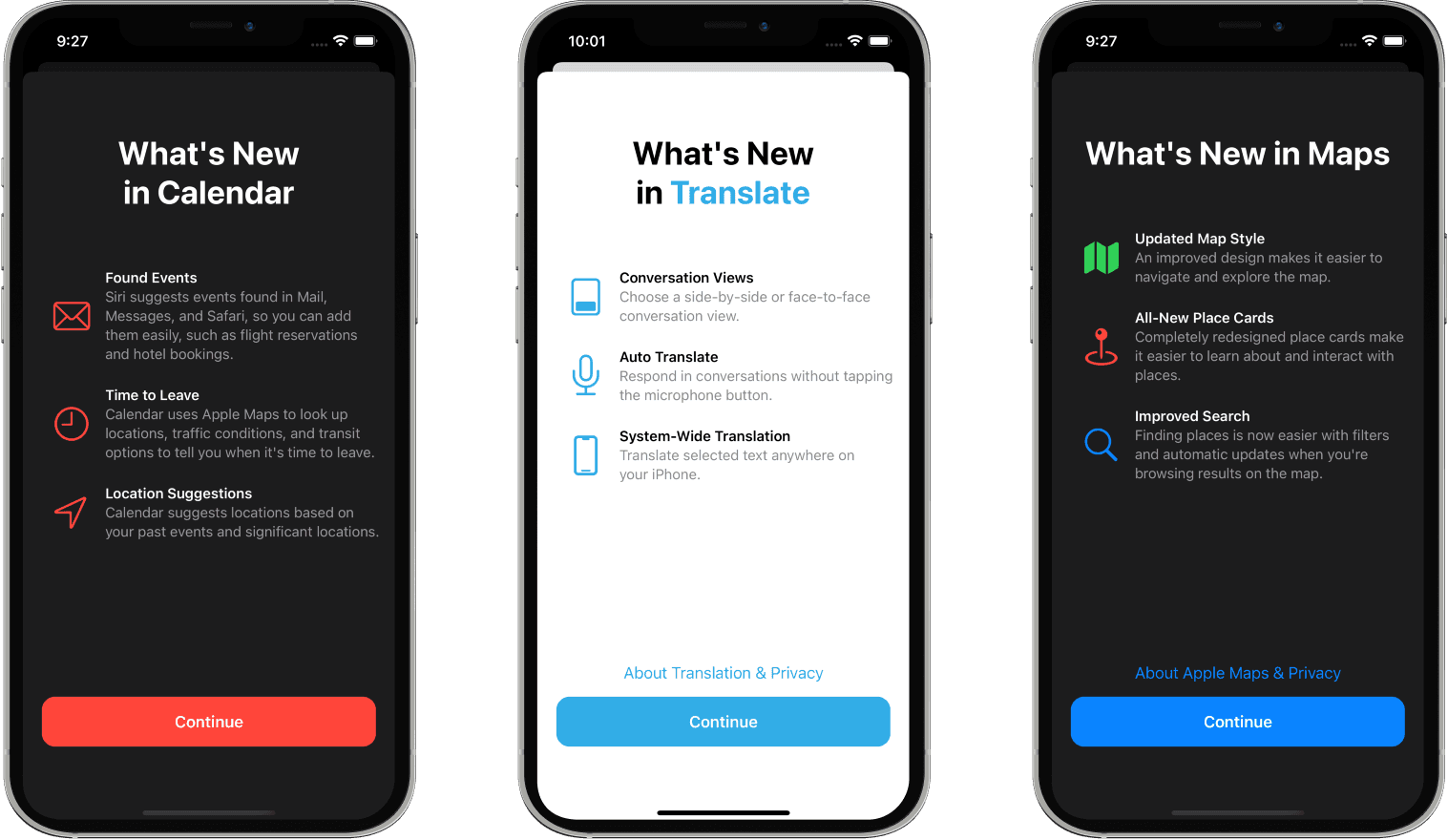
版本新功能模块
WhatsNews 模块基于 WhatsNewKit 实现,用于向用户展示应用的新功能和更新内容。当用户更新应用后,会自动展示相应版本的新功能介绍页面。
为什么需要 WhatsNews 功能?
1. 提升用户体验
- 让用户了解应用的最新功能和改进
- 减少用户对新功能的困惑
- 提高新功能的使用率和发现率
2. 产品推广价值
- 突出展示核心功能更新
- 增强用户对产品迭代的感知
- 提升应用更新后的用户留存率
3. 用户教育
- 引导用户使用新功能
- 解释界面变化和操作流程
- 降低用户学习成本
核心特性
- 自动展示 - 根据应用版本自动判断是否需要展示
- 版本管理 - 智能记录已展示的版本,避免重复显示
- 灵活配置 - 支持多版本内容配置
- 美观界面 - 提供精美的原生 SwiftUI 界面
- 交互丰富 - 支持主要操作和次要操作按钮
集成实现
1. 环境配置
在主视图中配置 WhatsNew 环境:
struct ContentView: View {
    var body: some View {
        MainView()
            .environment(
                \.whatsNew,
                .init(
                    versionStore: UserDefaultsWhatsNewVersionStore(),
                    whatsNewCollection: self
                )
            )
    }
}
2. 内容配置
实现 WhatsNewCollectionProvider 协议来定义各版本的新功能内容:
extension ContentView: WhatsNewCollectionProvider {
    var whatsNewCollection: WhatsNewCollection {
        // 当前版本的新功能
        WhatsNew(
            version: .current(),
            title: "欢迎使用新版本",
            features: [
                .init(
                    image: .init(
                        systemName: "apps.iphone",
                        foregroundColor: .black
                    ),
                    title: "全新界面设计",
                    subtitle: "我们重新设计了应用界面,带来更好的用户体验"
                )
            ],
            primaryAction: .init(
                title: "开始使用",
                hapticFeedback: .notification(.success)
            ),
            secondaryAction: WhatsNew.SecondaryAction(
                title: "了解更多",
                foregroundColor: .accentColor,
                hapticFeedback: .selection,
                action: .openURL(
                    .init(string: "https://example.com")
                )
            )
        )

        // 历史版本配置
        WhatsNew(
            version: "1.0.0",
            title: "欢迎使用应用",
            features: [
                .init(
                    image: .init(
                        systemName: "newspaper",
                        foregroundColor: .black
                    ),
                    title: "核心功能上线",
                    subtitle: "应用的基础功能已经准备就绪"
                )
            ],
            primaryAction: .init(
                title: "立即体验",
                hapticFeedback: .notification(.success)
            )
        )
    }
}
功能配置详解
版本管理
- 自动版本 - 使用
.current()获取当前应用版本 - 指定版本 - 手动指定版本号如
"1.0.0" - 版本存储 - 使用
UserDefaultsWhatsNewVersionStore记录已展示版本
内容元素
标题 (Title)
title: "应用更新"功能特性 (Features)
.init(
    image: .init(systemName: "star.fill", foregroundColor: .orange),
    title: "新功能标题",
    subtitle: "功能详细描述"
)
主要操作 (Primary Action)
primaryAction: .init(
    title: "继续",
    backgroundColor: .accentColor,
    foregroundColor: .white,
    hapticFeedback: .notification(.success)
)
次要操作 (Secondary Action)
secondaryAction: WhatsNew.SecondaryAction(
    title: "了解更多",
    action: .openURL(.init(string: "https://example.com"))
)
展示逻辑
- 应用启动时 - 自动检查当前版本是否已展示过新功能页面
- 版本比对 - 与存储的已展示版本进行比较
- 内容展示 - 如果是新版本,自动弹出新功能介绍
- 状态记录 - 用户查看后自动记录该版本已展示
自定义选项
存储方式
// 本地存储(默认)
UserDefaultsWhatsNewVersionStore()

// iCloud 同步存储
NSUbiquitousKeyValueWhatsNewVersionStore()

// 内存存储(测试用)
InMemoryWhatsNewVersionStore()
布局自定义
.environment(
    \.whatsNew,
    .init(
        defaultLayout: WhatsNew.Layout(
            showsScrollViewIndicators: true,
            featureListSpacing: 35,
            contentPadding: EdgeInsets(top: 20, leading: 16, bottom: 20, trailing: 16)
        ),
        versionStore: UserDefaultsWhatsNewVersionStore(),
        whatsNewCollection: self
    )
)
最佳实践
1. 内容策略
- 突出最重要的3-5个新功能
- 使用简洁明了的描述文字
- 配合有意义的图标或插图
2. 版本规划
- 重大版本更新必须配置新功能页面
- 小版本更新可选择性配置
- 保持历史版本配置的完整性
3. 用户体验
- 提供跳过或快速浏览选项
- 避免过度频繁的新功能提示
- 确保新功能介绍的准确性
通过 WhatsNews 模块,您可以轻松为应用添加专业的版本更新介绍功能,提升用户体验和产品价值感知。
Last updated on